Description
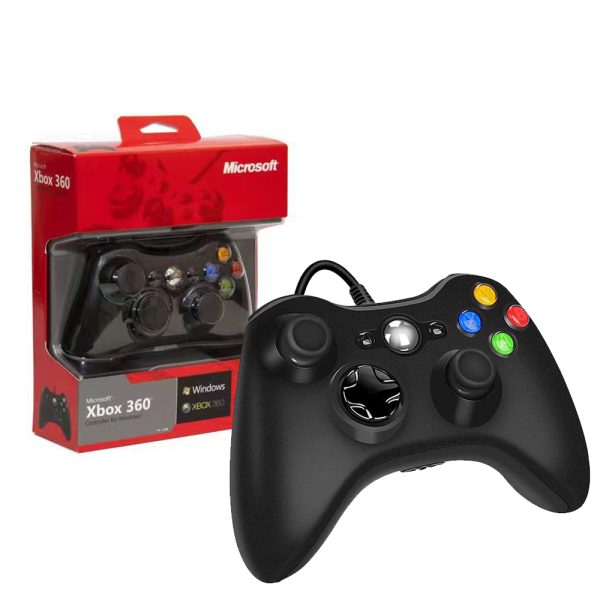
The Xbox 360 Wireless Controller is a gamepad designed for use with the Xbox 360 console, but it can also be used on Windows PCs. Here’s an overview of its key features:
Key Features:
- Wireless Connectivity: It connects to the Xbox 360 console via a proprietary wireless connection, allowing for freedom of movement during gameplay.
- Ergonomic Design: The controller is known for its comfortable, user-friendly design, with contoured grips and buttons that are positioned for easy access.
- Battery-Powered: The controller operates on either two AA batteries or a rechargeable battery pack, which can be replaced or recharged as needed.
- Buttons & Controls:
- Directional Pad: For navigating menus or controlling movement in games.
- A, B, X, Y Buttons: Standard buttons for various functions within games.
- Shoulder Buttons: Lb/Rb (Left and Right Bumper) and Lt/Rt (Left and Right Trigger) for extra controls, especially in shooters or racing games.
- Analog Sticks: Left and right thumbsticks for 360-degree movement, offering precision for aiming or movement.
- Start/Back Buttons: Start for pausing gameplay or bringing up in-game menus, and Back for various functions like accessing inventory.
- Guide Button: A button in the center that opens the Xbox 360 dashboard or turns the console on.
- PC Compatibility: While the controller is built for the Xbox 360, it can also be used on a Windows PC with the appropriate driver software, either via a wireless receiver or with a USB cable (for wired versions).
- Range: The wireless connection typically has a range of up to 30 feet.